
IO wiring
Place a switch, a timer and a light on your map, and the IO tool is where you run wire between them, so the circuit is already built when the map boots. You click a wireable prefab to make it a node, click one output handle and one input handle to run a wire, and the panel checks each wire as you go.
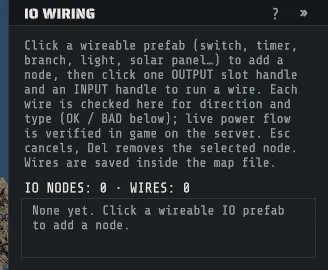
Pick IO Wiring on the tool rail. There is no default shortcut for it. The status bar then reads:
LMB an IO prefab to add a node · click a slot then another to wire · Esc cancels · Del removesWire a circuit
Section titled “Wire a circuit”- Place the prefabs you want to wire, and position them before you wire them.
- Click a wireable prefab: a switch, a button, a timer, a branch, a light, a solar panel, a generator. It becomes a node, listed as its id and its prefab name.
- Look at the handles that appear on the node. Inputs run up one side, outputs up the other.
- Click an output handle, then an input handle. That is one wire, and the click order is worked out for you, so picking them the other way round still makes a correctly oriented wire.
- Press Esc to abandon a half-made wire.
- Select a node and press Del to delete it. Its wires go with it, as one undo step.
A wire runs from an output to an input of the same IO type, and Creator will not create one that
does not. Each wire is listed under the selected node as OK or BAD with the reason, and the panel
carries a whole-map roll-up: IO NODES, WIRES, and how many of them are OK and BAD. A wire made by
the tool is valid when you make it, so a BAD row means something changed underneath it later.
Wiring that arrives with a build. FILE > Import CopyPaste… (see Prefabs) brings a wired build’s wiring with it. Each connection between two objects that were placed becomes a wire here, each object that ends one becomes a node, and the settings listed under Per-node settings that the file carries are set on it. A wire is left out when one of its ends was not placed, is not a prefab this tool can wire, or names a slot the prefab does not have, and the message after the import says how many were. It also counts a setting the file carries that Creator has no row for on that object (“2 settings Creator does not carry”), so nothing is dropped without a word. The wiring is part of the import’s own undo step.
Slot names
Section titled “Slot names”Creator knows the real slot names for the game’s 192 IO prefabs. For those, the panel shows the names the
game uses, under in: and out:, and the handles sit where the game puts them. The panel’s Kind:
line says in plain words what kind of object the prefab is (for example Kind: Door manipulator), which
decides the settings below. Point at it for the game’s own name for the kind.
Any other prefab that reads as an IO entity still works: it gets one generic power in and one
power out, and its handles are laid out on the sides of the object. You can wire it, you just do
not get its real slot names.
Per-node settings
Section titled “Per-node settings”Select a node and the panel shows the settings that kind of object really has, and only those. A card
reader shows Access level, a timer shows Timer seconds, and a switch, a light or a generator
shows This kind of object has no settings. The settings ride on the node, are saved in the map
with the wiring, and are set on the server by the extension.
| Object | Setting | What it sets |
|---|---|---|
| Timer | Timer seconds | How long a timer stays on after it is triggered. |
| Electrical branch | Branch amount | How much power the branch takes for its branch output, 1 to 10000000. |
| Counter | Counter target | The number the counter counts to before it passes power on, 1 to 999. |
| Counter | Show passthrough | The counter shows the power passing through it and passes it on, instead of counting. |
| Card reader | Access level | Which keycard opens it: Green, Blue or Red. |
| Door controller | Door action | What the controller does to its door while it has power: Close, Open, or Toggle on each new pulse. |
| Auto turret | Weapon | The weapon the turret is loaded with when the map starts, by item shortname, for example rifle.ak. |
| Auto turret | Peacekeeper | The turret fires only at players who are hostile. |
| Auto turret | Unlimited ammo | The server extension keeps the turret’s weapon supplied with ammunition. |
| Auto turret, CCTV camera | Identifier | The name a computer station lists it under. Letters and digits, 32 at most. |
| RF broadcaster, RF receiver | Frequency | The radio frequency it sends on or listens to, 1 to 999999. |
| Telephone | Phone name | The name the phone shows in every other phone’s directory, 30 characters at most. |
| Button | Press seconds | How long the button stays pressed after someone presses it. |
A setting you have not set is left alone on the server. The row shows the value the prefab
itself has, dimmed, with Not set. under it, and the object keeps what the game gives it. Change the
field, the dropdown or the switch and the row is set: it commits when you leave the field, it is one
undo step, and the value is applied on the server even when it equals the prefab’s own. Press
PREFAB’S OWN on a set row to clear it again, or empty its field.
A value the game could not take is refused when you enter it, and the message says why. A broadcaster cannot use 4760 to 4790, because Rust keeps those frequencies for itself; a receiver can listen to them.
Five things worth knowing before you rely on a setting, each from how Rust’s server works:
- A card reader has no time setting. Rust’s server keeps a reader on after a swipe until its puzzle resets, whatever number a map stores for it.
- Door action is for the door controller made for maps (the
doormanipulatorprefabs). It pairs with the nearest door within 1 m of it. The door controller a player deploys ignores the action and controls only a door it was deployed on, so placed on a map it controls nothing. The panel says so under the node, and it tells you when a map door controller has no door near it. - Unlimited ammo is the extension’s doing. Rust has no such setting on a normal turret, so the extension tops the turret up, locks its container so nobody can take the ammunition, and makes the turret drop nothing when it is destroyed. Turn the setting off and the next server start takes that ammunition back out and unlocks the container. The server saves the ammunition and the lock with the turret, so before you take the extension off a server, turn the setting off and restart once.
- A static elevator has no floor setting. Rust counts the floors from the elevator sections stacked under the top one when the map starts.
- Two cameras with one identifier both spawn, and a computer station reaches only one of them. The panel names the nodes that share one.
The notes the panel shows under a node are also in the map’s server-ready check. None of them stops the map from running.
On the server, the extension logs the settings it set, and names each node it could not set with the
reason. The whole step can be turned off on the server with RC_EXT_IOSETTINGS=0, which leaves every wired
object with the values the game gives it and still runs the wires.
A prefab that is not in Creator’s tables can still be wired with the generic slots, and it shows
No settings. with the reason, because Creator does not know what kind of object it is.
Computer stations
Section titled “Computer stations”A computer station is not a wired object, and it still has one setting: the cameras it lists. Click a placed computer station with the IO Wiring tool and it becomes a node like any other, with no handles, because it has no slots. It cannot start or end a wire.
Its one setting is Camera list: the identifiers of the cameras and turrets the station shows, separated by commas, 128 at most. Type them, or press ADD EVERY CAMERA ON THIS MAP, which adds the identifier of every camera node on the map in one undo step. A camera needs an Identifier of its own first, set on the camera’s node.
The station prefabs made for monuments already list every static camera within 100 m of them when the map starts, and the panel says so under the row. Use the list for the cameras that rule misses: a camera farther away, a camera of the kind players deploy, or any camera on the station players deploy.
The panel notes an identifier on the list that no camera or turret node on the map answers to. That can be right, when the camera is part of a monument and brings its own identifier.
Saving and the server
Section titled “Saving and the server”Wiring is saved inside the .map. Applying it needs the server extension: see
Run your map on a server. Without it the prefabs still spawn,
and nothing is wired.
Wiring depends on the prefab staying where it was when you wired it. A node that matches nothing is reported in the server log.
Two nodes of the same prefab can’t sit almost on top of each other; the save stops with Save blocked. and names them. Move one of them apart and save again.
Saving a RustEdit map in Creator keeps its wiring, loot, vending and NPC spawners working.